Scouts to Mission Control
Arise · Job Hunting + Outreach
Two engines run every day without anyone writing code: one finds jobs for the team, one finds business leads. Both work the same way — find, check, score, write, and always stop for a human before anything goes out.
This page is what your part in that is. You never need to read a script or open a log file to do this job — you need to know the eight stations below, know which ones are yours, and know what "something's wrong" looks like.
01The pipeline, in order
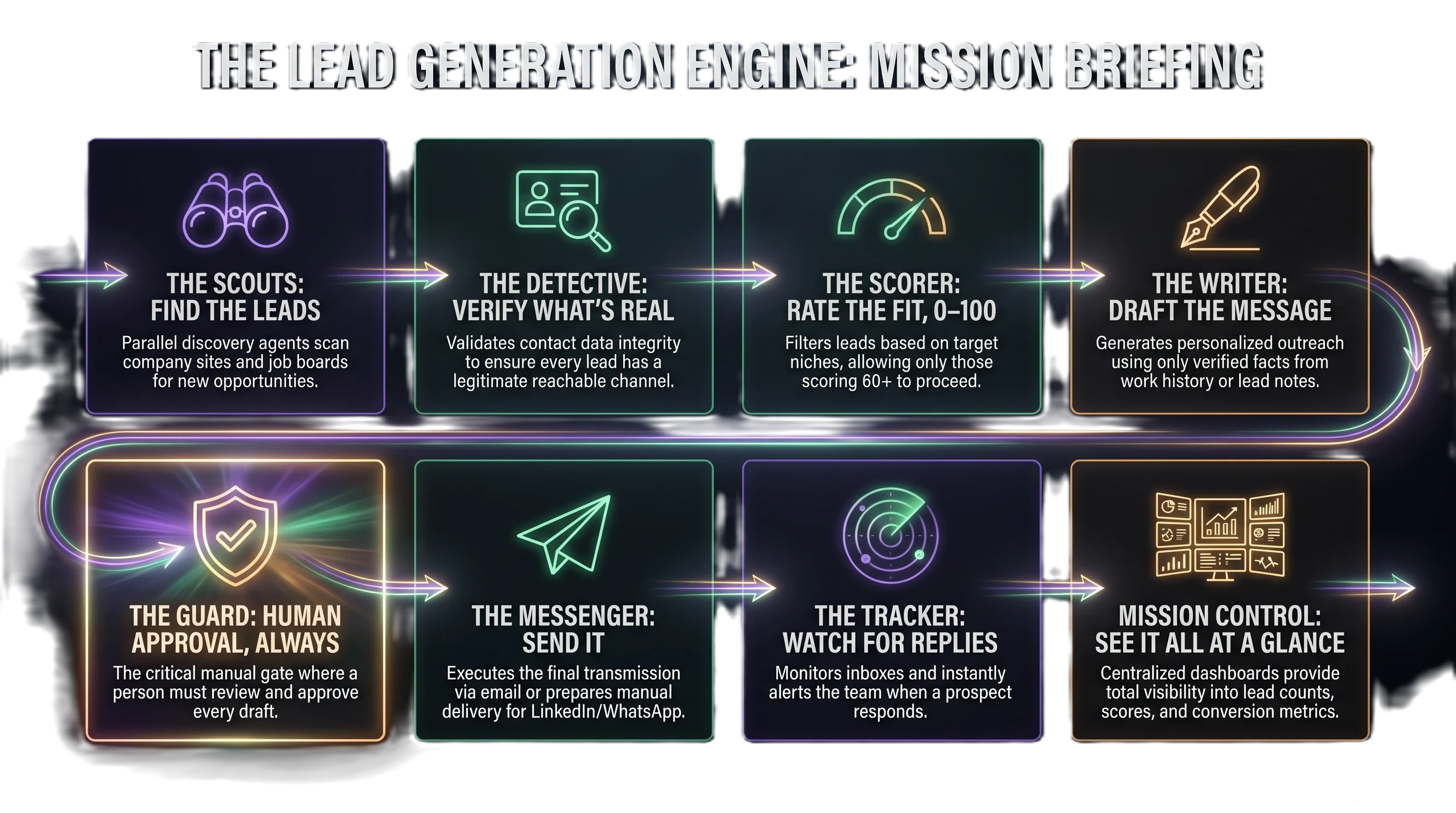
Same eight stations run both engines — job hunting finds jobs, outreach finds business leads, but the shape is identical.
The Scouts discovery
Go out and find real candidates — job postings from company sites and job boards, or real businesses from Google Maps. Several different scouts run in parallel, so if one runs out of budget for the day, the others keep finding leads.
The Detective verification
Checks that a contact is actually real before anyone trusts it — a working email, a real Instagram page, a real HR inbox. Never invents a contact. If nothing real is found, the lead isn't thrown away — it's flagged for a phone call or in-person visit instead.
The Scorer scoring
Rates the fit 0–100 — how well this job matches the person, or how well this business matches Arise's real target niches. Only things scoring 60 or above move forward to drafting, so nobody's time gets spent writing to a bad fit.
The Writer drafting · Claude Haiku
Writes the actual resume, cover letter, or outreach message. It's only allowed to use real facts — your real work history, or real details from a lead's own notes. If it can't find a real fact to back up a claim, it's built to leave that claim out rather than invent one.
The Guard human reviewThis is you
Nothing is ever sent automatically. A drafted resume or message sits in Baserow until a real person reads it and ticks "Ready to Send." This is the one station in the whole pipeline that a person, not code, is responsible for — see "Who does what" below.
The Messenger sending
Once you've approved something, this is what actually sends the email (or, for LinkedIn/WhatsApp, hands you the drafted message to send yourself — those stay manual on purpose).
The Tracker replies + bounces
Watches the inbox. The moment a real reply lands, it pings Imran on Telegram immediately — interview, response, whatever it is, nobody has to go check manually.
Mission Control dashboards
Three pages where the whole pipeline is visible at a glance — how many found, scored, drafted, sent, replied. Real links are at the bottom of this page.
02Who does what
Everyone's job is the same shape: be the Guard for your own lane, and know when to speak up.
- Job Hunting — reviews her own drafted resumes + cover letters in Baserow, ticks Ready to Send.
- Outreach — owns every dental-clinic lead: UAE, Saudi, India, Ireland. Reviews the drafted email/DM before it goes out.
- If a dental clinic's message reads generic or wrong for that clinic, fix it or flag it — don't send as-is.
- Job Hunting — reviews her own drafted resumes + cover letters in Baserow, ticks Ready to Send.
- Outreach — owns every abaya shop, Islamic clothing store, and Quran academy lead: UAE, Saudi, India, Ireland.
- Same rule: a message that doesn't actually fit that specific shop or academy gets fixed before it's approved, never sent as a generic template.
- Doesn't send or approve messages in either system — by design, not an oversight.
- Her real job — check the dashboards regularly. Numbers stuck at zero for days, the same error repeating, a page that won't load — that's worth noticing before anyone else does.
- Found something odd? Tell Imran what you saw and where — you don't need to know why it's happening.
03What to look for
You don't need to judge quality on vibes — a few concrete things are always wrong, no matter how good the writing sounds.